100 Days of CUDA
My Notes and codes documentation for CUDA learning journey
Summary of Day 21:
Starting Chapter 8: Stencil
Stencil Computation: What is it?
Stencil computations are a class of numerical algorithms used to update elements in a data grid based on neighboring values. They appear in many scientific and engineering applications, such as:
- Solving Partial Differential Equations (PDEs)
- Heat Diffusion Simulations
- Image Processing (Blurring, Edge Detection)
- Fluid Dynamics & Weather Simulation
Each point in a grid is updated by applying a fixed pattern (stencil) over its neighborhood.
Difference Between Stencil Computation and Convolution:
Though both apply a kernel to a region of data, they differ in intent:
| Features | Stencil Computation | Convolution |
|---|---|---|
| Purpose | Used in PDEs, scientific computing | Mostly used in deep learning & signal/image processing |
| Operation | Updates each grid point based on its neighbors | Computes weighted sum using a kernel |
| Data Dependency | Strong dependencies on neighboring values | Often applied with independent operations |
Stencil computations typically involve solving differential equations, while convolution is a mathematical operation used in filtering and feature extraction.
Stencils:
Definition: A stencil is a pattern of weights applied to grid points for numerical approximations of derivatives.
- Finite-Difference Approximation For a function $f(x)$, the first derivative is approximated as:
f'(x) = \frac{f(x+h)- f(x-h)}{2h} + O(h^2)
where:
- $h$: grid spacing
- $O(h^2)$: error term, proportional to $h^2$
Discrete Derivative Example: Given grid array $F[i]$,
F_{D}[i] = \frac{F[i+1]- F[i-1]}{2h}Rewriting as a weighted sum:
F_{D}[i] = - \frac{1}{2h}F[i-1] + \frac{1}{2h} F[i+1]This defines a three-point stencil.
*Slight Notes:
Higher-Order Stencils
- Five-point stencil (second derivatives) involves $[i-2, i-1, i, i+1, i+2]$.
- Seven-point stencil (third derivatives) involves three points on either side and so on.
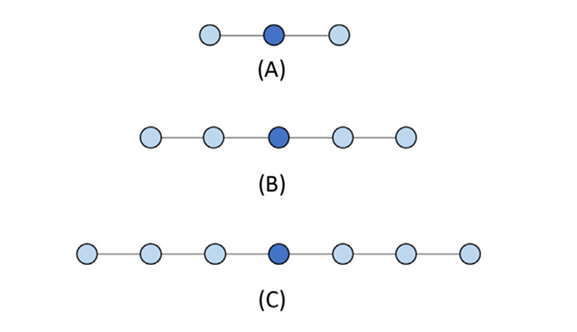
Fig 21_01: One-dimensional stencil examples. (A)Three-point (order1) stencil. (B)Five-point (order2) stencil. (C)Seven-point (order3) stencil.
2D Stencils
For PDEs with two variables $(x,y)$:
- Five-point stencil (Order 1): Uses grid points along x/y axes.
- Nine-point stencil (Order 2): Includes diagonals.
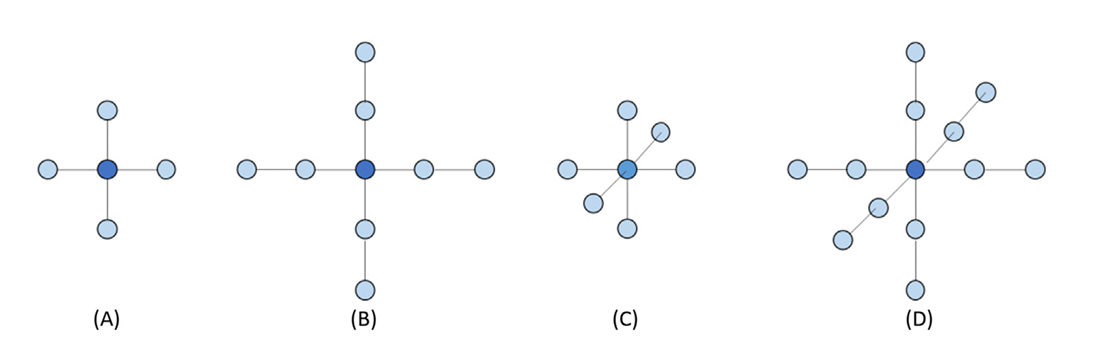
Fig 21_02: (A)Two-dimensional five-point stencil (order1).(B)Two-dimensional nine-point stencil (order2). (C)Three-dimensional seven-point stencil (order1). (D)Three-dimensional 13 point stencil (order2).
Parallel Stencil: A Basic Algorithm
Boundary Conditions: Boundary cells store fixed values and do not update during computation.
Kernel Code for basic CUDA for Stencil Swap:
__global__ void stencil_kernel(float* in, float* out, unsigned int N) {
    unsigned int i = blockIdx.z * blockDim.z + threadIdx.z;
    unsigned int j = blockIdx.y * blockDim.y + threadIdx.y;
    unsigned int k = blockIdx.x * blockDim.x + threadIdx.x;

    if (i >= 1 && i < N - 1 && j >= 1 && j < N - 1 && k >= 1 && k < N - 1) {
        out[i*N*N + j*N + k] =
              c0 * in[i*N*N + j*N + k]
            + c1 * in[i*N*N + j*N + k - 1]
            + c2 * in[i*N*N + j*N + k + 1]
            + c3 * in[i*N*N + (j - 1)*N + k]
            + c4 * in[i*N*N + (j + 1)*N + k]
            + c5 * in[(i - 1)*N*N + j*N + k]
            + c6 * in[(i + 1)*N*N + j*N + k];
    }
}
The full code implementation: Click Here to redirect!
Performance Analysis: Each thread:
- Performs 13 floating-point operations (7 multiplications + 6 additions).
- Loads 7 input values from global memory.
Arithmetic Intensity:
\text{Ratio} = \frac{13}{7 \times 4} = 0.46 \space \text{OP/B}This low ratio suggests the kernel is memory-bound.
Shared Memory Tiling for Stencil Sweep
Shared Memory Optimization:
Shared memory tiling reduces global memory access by caching reusable data on-chip.
Input tile: Includes halo regions around the output tile.
Kernel Code for Optimized Kernel using Shared Memory
__global__ void tiled_stencil_kernel(float* in, float* out, unsigned int N) {
    __shared__ float tile[IN_TILE_DIM][IN_TILE_DIM][IN_TILE_DIM];

    int i = blockIdx.z * OUT_TILE_DIM + threadIdx.z - HALO;
    int j = blockIdx.y * OUT_TILE_DIM + threadIdx.y - HALO;
    int k = blockIdx.x * OUT_TILE_DIM + threadIdx.x - HALO;

    if (i >= 0 && i < N && j >= 0 && j < N && k >= 0 && k < N) {
        tile[threadIdx.z][threadIdx.y][threadIdx.x] = in[i*N*N + j*N + k];
    }
    __syncthreads();

    if (threadIdx.z >= HALO && threadIdx.z < IN_TILE_DIM-HALO &&
        threadIdx.y >= HALO && threadIdx.y < IN_TILE_DIM-HALO &&
        threadIdx.x >= HALO && threadIdx.x < IN_TILE_DIM-HALO) {
        out[i*N*N + j*N + k] =
              c0 * tile[threadIdx.z][threadIdx.y][threadIdx.x]
            + c1 * tile[threadIdx.z][threadIdx.y][threadIdx.x - 1]
            + c2 * tile[threadIdx.z][threadIdx.y][threadIdx.x + 1]
            + c3 * tile[threadIdx.z][threadIdx.y - 1][threadIdx.x]
            + c4 * tile[threadIdx.z][threadIdx.y + 1][threadIdx.x]
            + c5 * tile[threadIdx.z - 1][threadIdx.y][threadIdx.x]
            + c6 * tile[threadIdx.z + 1][threadIdx.y][threadIdx.x];
    }
}
Full code implementation: Click Here to redirect!
Key Optimizations:
- Shared memory stores input tiles to minimize global memory accesses.
- Threads load data collaboratively.
- Halo regions ensure boundary conditions.
- Synchronization (
__syncthreads()) prevents race conditions.
Improved Arithmetic-to-Memory Ratio
With shared memory tiling:
\text{Ratio} = \frac{13(T-2)^3}{4T^3}
For large tiles $(T » Halo)$:
\text{Ratio} \approx 3.25 \space \text{OP/B}
Challenges with Small Tile Sizes:
- Small tiles (e.g., $T=8$) limit reuse ratio to $≈1.37 \space OP/B$.
- High halo overhead reduces efficiency.